
Today we are going to see how we can manage a session in Flask to be able to store information between each of the requests we make about our application.
Flask Session Object
The first thing we have to know is that the object that manages the session in Flask is session. Therefore, the first thing we have to do is import said object from Flask.
from flask import Flask, session
Flask Session object and cookies
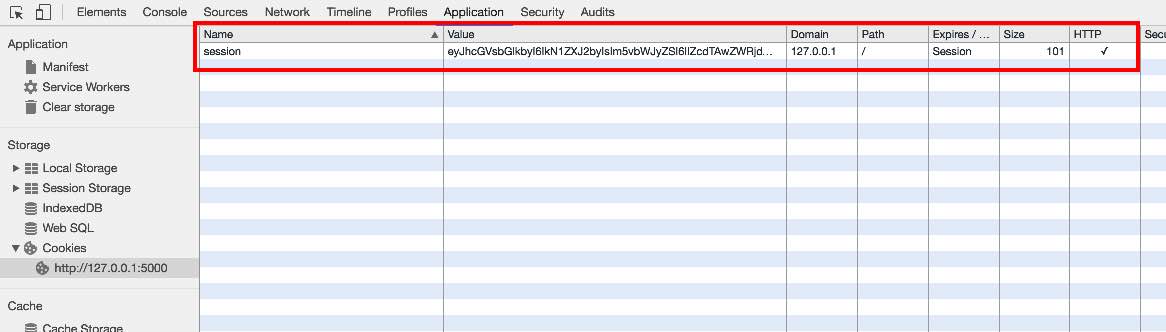
It is important to know how Flask manages sessions, since it does not use a memory space between each of the requests, although we could extend it and implement it, but what it does, by default, is create a cookie with the content of the session.
In order to create the cookie and encrypt its contents, you need a secret key. We will define the secret key as follows:
app.secret_key = 'this-is-a-very-secret-key'
How can we see the cookie appears in the browser with the encrypted session data.
Access to Flask Session
Now we are going to add content to the session. For example, in a first method we are going to paint a form that asks the user for data and saves it in memory.
@app.route('/greeting',methods=['POST'])
def greeting():
    name = request.form['name']
    lastname = request.form['lastname']
    session['name'] = name
    session['lastname'] = lastname
    return 'Hello ' + first name + ' ' + last name
We see that we use the following structure to save data in session.
session['variable_name'] = 'value'
The next thing will be to consult this information from the Flask session and use its content. In this regard we have created a method that displays this information.
@app.route('/session-data',methods=['GET'])
def session_data():
    if 'name' in session:
        name = session['name']
    else:
        name = ''

    if 'last name' in session:
        lastname = session['lastname']
    else:
        last name = ''

    return 'Session Data: ' + name + ' ' + last name
We see that it uses the same structure as before, but without assignment, to be able to display the content.
session['variable_name']
It is also interesting to validate that the variable exists in the session, before accessing it. That is why we have used the in structure to perform this validation.
if 'name' in session:
  name = session['name']
In this way we have already seen how we can manage the session in Flask.