
As many of you know Mozilla has been developing Mozilla Persona (Previously called BrowserID) for quite some time to be one of the standards in centralized identification and provide alternatives to current systems.
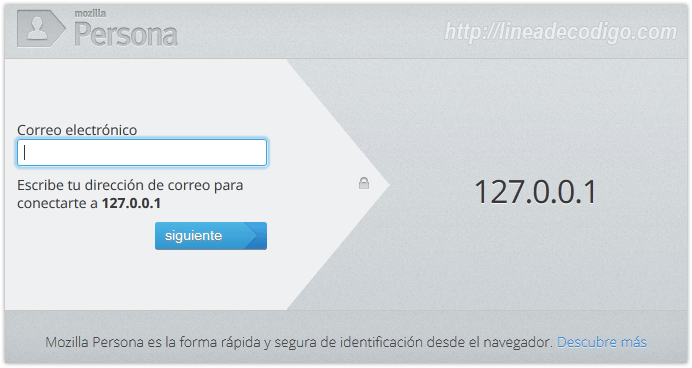
But what is different about Mozilla Persona from OpenID or Facebook Connect?
- The first significant difference is that Mozilla does not leak information to third parties.
- It is much easier for the user to register.
- Facilities for the developer, with an entire community of people who collaborate with each other to facilitate documentation.
To me personally, it seems like a great advance when it comes to trying to unify the Internet, and more so from a company like Mozilla (if I admit, I’m a bit of a mythomaniac), in addition to the fact that it respects all standards, uses a fairly minimalist design and looks good on all websites.
Well after this pseudo presentation, let’s see how we can connect from PHP5 to the Mozilla servers to verify the sessions, we will also touch on some front-end to explain the facade.
Let’s start talking about the back-end that we must use on our server, for the example I am going to give a version of PHP equal to or greater than 5, have the module activated Open SSL, have fopen.
Connecting with Mozilla People
First of all we are going to create a class that will carry out all the procedures for connecting with Mozilla Personas. We will call this class class.mozilla.php. Within it we will encapsulate the methods necessary to connect to Mozilla Personas and so that we can instantiate it from various sites.
First of all we will define a constant with the Mozilla People server that performs the validations:
const REMOTE_URL = 'https://login.persona.org/verify';
The first method will be build_query. This method will be the one that builds the query that we are going to send to Mozilla Personas.
private function build_query(){
  //We create an array with the request received by the client and the url address of our domain.
  $httpArray = array( 'assertion' => $this->_assertion,
    'audience' => urlencode($this->_localURL));

  //We encode the data in URL format
  $data = http_build_query($httpArray);

  // We create the request and the HTTP headers.
  $this->_QueryHTTP = array('http' => array( 'method' => 'POST',
    'content' => $data,
    'header' => "Content-type: application/x-www-form-urlencodedrn"
      . "Content-Length: " . strlen($data) . "rn")
  );
}
The set of data that we send will be composed of the assertion, which comes to us from the client, and the URL on which we want to perform the validation.
The next thing will be to send this data to the Mozilla Personas server. For this we are going to rely on the fopen class.
public function set_http_request(){

  //We create the text flow that will be sent to Mozilla from the _QueryHTTP property.
  $ctx = stream_context_create($this->_QueryHTTP);

  //We create the connection with Mozilla and send the context of the request.
  $fp = fopen(self::REMOTE_URL, 'rb', false, $ctx);

  //If the connection was correct.
  if ($fp) {
    //We read the content of the response.
    $result = stream_get_contents($fp);

    //We assign the decoded Json response to the _RequestJSON property.
    $this->_RequestJSON = json_decode($result);

    return true;
  }
}
If the validation is correct, Mozilla Personas will return something like this:
{
    "status": "okay",
    "email": "[email protected]",
    "audience": "https://lineadecodigo.com",
    "expires": 1308859352261,
    "issuer": "browserid.org"
}
We keep them to be able to access the content of the result. Especially to the status and email fields.
Login process
In the login process what we will do is interact with the methods of our class class.mozilla.php. To do this, the first thing we will do is include it and instantiate it.
//We require the class previously exposed
require_once('class.mozilla.php');

//We create the object with the value received from the POST and our Domain
$objMozilla = new Mozilla_Persona($_POST['assertion'], 'lineadecodigo.com');
As you can see, we pass the name of the server on which we want to create the validation.
The next thing will be to send data with the method we created previously, set_http_request, and validate if the login has occurred correctly. If so, we access the email, saving it in the session and returning the data, status and action of new through JSON. This action will help us refresh the page.
//We check that the connection has been made correctly
if($objMozilla->set_http_request()){
    //We check if the identification was correct
    if($objMozilla->get_is_login()) {
        //We assign the email to the session variable
        $_SESSION['email'] = $objMozilla->get_email();

        //It prints that everything was correct in Json format
        echo json_encode(array("status" => "okay", "action" => 'new'));
    }
}
Front-end of our application
Now we will move on to the
front-end
, JQuery and the include.js library from Mozilla Persona are required.
The use of the include.js library is essential since it is the one that has all the visual part of Mozilla Personas authentication. To do this we will have to call the navigator.id.get method.
$(document).ready(function(){
  $('#browserid').click(function() {
    navigator.id.get(gotAssertion, {allowPersistent: true});
    return false;
  });
})
This method expects a function that will perform AJAX communication via JSON with our login process.
function gotAssertion(assertion) {
  if (assertion !== null) {
    $.ajax({
    type: 'POST',
    url: 'login.php',
    data: { assertion: assertion, browserid: true },
    success: function(res, status, xhr) {
      if (res !== null) {
        var oJson = jQuery.parseJSON(res);

        if(oJson.status == 'okay'){
          //If everything is correct the page is refreshed.
          if(oJson.action == 'new') location.reload(true);
        } else {
          alert("Error");
        }
      }
    },
    error: function(res, status, xhr) {
      alert("Connection error");
    }});
  }
  }
As you can see, these are very simple examples that are very easy for the programmer. If you are more interested in the topic, you can go to the page for developers that Mozilla has.
here.
I hope you are encouraged to try them on your web systems and also to contribute to a cleaner and safer Internet.